
Plugins and API definitions Last updated 17-Dec-2024
You can use plugins to expand the capabilities of your DSAPI API Management (APIM) environment. Also a DSAPI API definition is a JSON representation of everything that the APIM Gateway needs to know for it to proxy, apply policies to, and to create plans for your APIs and their traffic.
For more information about plugins and DSAPI API definitions, refer to the following sections on this page:
Plugins overview
Overview
Plugins can be installed to expand the capabilities of DSAPI APIM Gateway, APIM Management API (mAPI), AM, or Alert Engine (AE). They can customize the component’s behavior to satisfy needs and technical constraints.
Info: For more technical information about plugins, including details of their directory structure and how to create your own, see the Custom Plugins Guide.
Types of Plugins
The table below lists the different types of plugins you can use with APIM and the component(s) they can be plugged into, respectively:
| Type | Gateway | mAPI | AM | AE | Examples |
|---|---|---|---|---|---|
| Alert | ✔ | ✔ | ✘ | ✘ | Vertx |
| Connector | ✔ | ✔ | ✘ | ✘ | Kafka, MQTT, WebSocket |
| Fetcher | ✘ | ✔ | ✘ | ✘ | HTTP, GIT |
| Identity provider | ✘ | ✔ | ✘ | ✘ | LDAP, Oauth2, InMemory |
| Notifier | ✘ | ✘ | ✘ | ✔ | Email, Slack, Webhook |
| Policy | ✔ | ✔ | ✘ | ✘ | API Key, Rate-limiting, Cache |
| Reporter | ✔ | ✘ | ✘ | ✘ | Elasticsearch, Accesslog |
| Repository | ✔ | ✔ | ✘ | ✘ | MongoDB, Redis, Elasticsearch |
| Resource | ✔ | ✔ | ✘ | ✘ | Oauth2, Cache, LDAP |
| Secret provider | ✔ | ✔ | ✔ | ✘ | Kubernetes, HC Vault |
| Services | ✔ | ✔ | ✘ | ✘ | Sync, local-registry, health-check, monitor |
Alert
An alert is used to send triggers or events to the Alert Engine. These can be processed to send a notification via the configured plugin notifier. Configuring the notifier is the responsibility of the trigger.
Connector
A connector is used to add support for specific protocols, API styles, event brokers, and/or message queue services. For example, the Websocket and Kafka connector plugins allow you to front a Kafka topic with a Websocket API, making that Kafka topic consumable over a WebSocket connection.
Identity provider
An identity provider brokers trust with external user providers to authenticate and obtain information about end users. Out-of-the-box identity providers are:
- MongoDB
- In-memory
- LDAP / Active Directory
- OpenID Connect IdP (Azure AD, Google)
Notifier
A notifier is used to send notifications. The notifiers offered by DSAPI are:
- Slack
- Webhook
Policy
A policy modifies the behavior of the request or response handled by the Gateway. It can be considered a proxy controller, guaranteeing that a given business rule is fulfilled during request/response processing. Policies can be chained by a request or response policy chain using a logical order.
Examples:
- Authorization using an API key
- Applying header or query parameter transformations
- Applying rate limiting or quotas to avoid API flooding
See Custom Policies for how to create, use, and deploy a custom policy.
Reporter
A reporter is used by an APIM Gateway instance to report events such as:
- Request/response metrics (e.g., response-time, content-length, api-key)
- Monitoring metrics (e.g., CPU, Heap usage)
- Health-check metrics (e.g., status, response code)
Out-of-the-box reporters:
- Elasticsearch Reporter
- File Reporter
- Metrics Reporter
- TCP reporter
You can create, use and deploy custom reporters as described in the Custom Plugins guide.
Repository
A repository is a pluggable storage component for API configuration, policy configuration, analytics, etc. See the Repositories documentation for more information.
Resource
A resource can be added to an API for its whole lifecycle. APIM includes three default resources:
- Cache
- OAuth2 - DSAPI Access Management
- OAuth2 - Generic Authorization Server
See Resources for more information.
Secret provider
A secret provider resolves secrets to avoid exposing plain text passwords and secrets
keys in the DSAPI.yml file. For example, users can store their MongoDB
password in a secret manager like HashiCorp Vault and then resolve it when the
platform starts.
Deploying Plugins
Deployment
Deploying a plugin is as easy as copying the plugin archive (zip) into the dedicated
directory. By default, you need to deploy the archives in
${DSAPI_HOME/plugins}. Refer to APIM
Gateway Configuration for more information on modifying the directory structure.
Warning: You must restart APIM nodes when applying new or updated plugins.
Discovery and Loading
Plugin discovery and loading occurs regardless of APIM license type. If a plugin is not included with your license, then it will be loaded but it will not be functional.
Phase 1: Discover Plugins
When APIM starts, all plugin zip files are read from the list of plugin directories set
in the dsapi.yaml configuration file.
Info: This operation is completed asynchronously for performance benefits.
If duplicates are found (same type and ID), the most recent file is kept regardless of the plugin's version. This allows for easily overriding plugins.
Plugin override circumvents the need to remove plugins to use a newer version, which is a huge benefit for Kubernetes deployments via DSAPI's Helm Chart. This also benefits plugin developers, as they can pack and copy an updated plugin without having to script the removal of the old version.
Phase 2: Load Plugins
After APIM finishes traversing the plugin directories, the plugins are loaded.
Plugins are immediately initialized by a specialized handler. If an error occurs while unpacking a plugin zip file, the faulty plugin is ignored. An error will be reported in the logs and the loading of the remaining plugins will resume.
The loading process is sequential and adheres to the following order based on plugin type:
- Cluster
- Cache
- Repository
- Alert
- Cockpit
- Any other types
The rest of the plugins are loaded in no particular order, except if they have dependencies. If a plugin depends on another plugin, that takes precedence over type ordering.
For example, if plugin1 (type:cluster) depends on
plugin2 (type:cache) which depends on plugin3 (type:alert),
then the plugins are loaded in the following order:
plugin3(because plugin 2 depends on it, even if it is #4 in the type priority list)plugin2(because plugin 1 depends on it, even if it is #2 in the type priority list)plugin1
Custom Plugins
Overview
DSAPI API Management (APIM) plugins extend and customize component behavior to meet your strategic needs. Each APIM distribution includes a default set of plugins. You can also deploy additional DSAPI-maintained and third-party plugins from the plugin marketplace.
Common Structure
Plugins follow a common structure:
                        -----------------
                        .
                        ├── pom.xml
                        ├── README.md
                        └── src
                            ├── assembly
                            │   └── <plugin>-assembly.xml
                            ├── main
                            │   ├── java
                            │   │   └── <main java files>
                            │   └── resources
                            │       └── plugin.properties
                            └── test
                                └── java
                                    └── <test java files>
                        -----------------
Below are the different key files:
| File | Description |
|---|---|
pom.xml |
The main Maven POM file |
README.md |
The main entry point for the plugin documentation |
<plugin>-assembly.xml |
The common Maven assembly descriptor |
plugin.properties |
The plugin descriptor file |
pom.xml
DSAPI projects are Maven-managed. A plugin project is described via the Maven Project Object Model file.
README.md
Each plugin should be documented by a dedicated README.md file that contains
comprehensive information related to the use of your plugin.
<plugin>-assembly.xml
To integrate with the DSAPI ecosystem, a plugin needs to be deployed with a given file
structure. The <plugin>-assembly.xml file is the Maven Assembly
descriptor used to build the distribution file, which has the following structure:
                        -----------------
                        .
                        ├── <main Jar file>.jar
                        └── lib
                        -----------------
The different files/folders are described below:
| File | Description |
|---|---|
<main Jar file>.jar |
The plugin’s main Jar file |
lib/ |
A directory containing external libraries to correctly execute the .jar |
.jar
The main .jar file of each plugin contains information on the business
behavior and the plugin descriptor
file.
lib/
This directory contains all of the plugin's external dependencies (non-provided-scope Maven dependencies).
plugin.properties
The plugin.properties file is the plugin descriptor, which acts as an ID
card and is read by APIM Gateway during the plugin loading process. The descriptor
includes the following parameters:
| Parameter | Description |
|---|---|
| id | The plugin identifier |
| name | The plugin name |
| version | The plugin version |
| description | The plugin description |
| class | The main plugin class |
| type | The type of plugin (e.g., policy, reporter) |
Warning: The plugin identifier must be unique for the APIM Gateway to load it correctly.
Info: See this page to learn how to deploy your custom plugin.
API Definitions and Execution Engines
Overview
A DSAPI API definition is a JSON representation of everything that the APIM gateway needs to know for it to proxy, apply policies to, and create plans for your APIs and their traffic. To execute APIs and policy flows, the gateway relies on a runtime environment referred to as the execution engine.
As DSAPI's gateway has evolved, a new execution engine version has been introduced focused on providing the runtime necessary to combine sync and async APIs in one platform. The new engine leverages a reactive execution methodology, which introduces some incompatibilities with the execution mode in older versions of DSAPI's gateway.
Some important initial differences are as follows:
- The v2 API Creation Wizard creates APIs compatible with the legacy execution engine. These can be augmented with flows designed in the v2 Policy Studio.
- The v4 API Creation Wizard creates v4 APIs compatible with the reactive execution engine. These can be augmented with flows designed in the v4 Policy Studio.
- v2 Gateway APIs can run in emulation mode to take advantage of certain execution flow improvements of the reactive engine.
The following sections summarize differences between the reactive and legacy execution engines and provide guidance for managing changes in system behavior when switching to the reactive engine or enabling compatibility mode with a v2 API.
Introduction to Reactive Execution Engine
Overview
The reactive execution engine is based on a modern and fully reactive architecture. It enables an improved execution flow for synchronous APIs and supports event-driven policy execution for asynchronous APIs. Added features include native support for pub/sub (publish-subscribe) design and the capability to enforce policies at the message level.
Key Improvements
The new reactive engine is designed to address a number of challenges associated with the legacy execution engine used for v2 APIs.
Policy execution order
Policies can be executed in the exact order in which they have been placed in the Policy Studio. This addresses a limitation of the legacy engine where policies interacting with the Head part of the request are always executed first, regardless of how they are ordered during the design phase.
With the new reactive execution engine, it is possible to apply logic on a Head policy based on the payload of the request, e.g., to apply dynamic routing based on the request payload.
v2 Gateway APIs have this capability when emulation mode is enabled.
Policy isolation
Proper isolation between platform-level policies and API-level policies is enforced during policy execution. This ensures that platform-level policies are executed before any API-level policies during the request stage and after any API-level policies during the response stage.
v2 Gateway APIs have this capability when emulation mode is enabled.
Simplified scopes
Scopes have been simplified for API publishers by merging onRequest and
onRequestContent into onRequest and
onResponse and onResponseContent into
onResponse. This means API publishers no longer have to define a scope
in the policy configuration for v4 APIs.
Async support
Message-based, asynchronous APIs such as Kafka, MQTT, WebSocket, SSE, and Webhook are supported.
Policy Support
The legacy execution engine supports all DSAPI policies that existed prior to the 4.0 release. These policies will continue to function without any changes to configuration or execution.
All policies will also support the new reactive execution engine, but not all policies can be applied at the message level. Whether a policy can be applied to v4 proxy APIs and/or v4 message APIs is detailed per policy in the Policy Reference Guide.
v2 Gateway API Emulation Mode
Info: By default, emulation mode is not enabled for v2 APIs because it may cause unexpected changes in behavior. Please review this guide in its entirety before enabling emulation mode.
v2 Gateway APIs can be run in emulation mode:
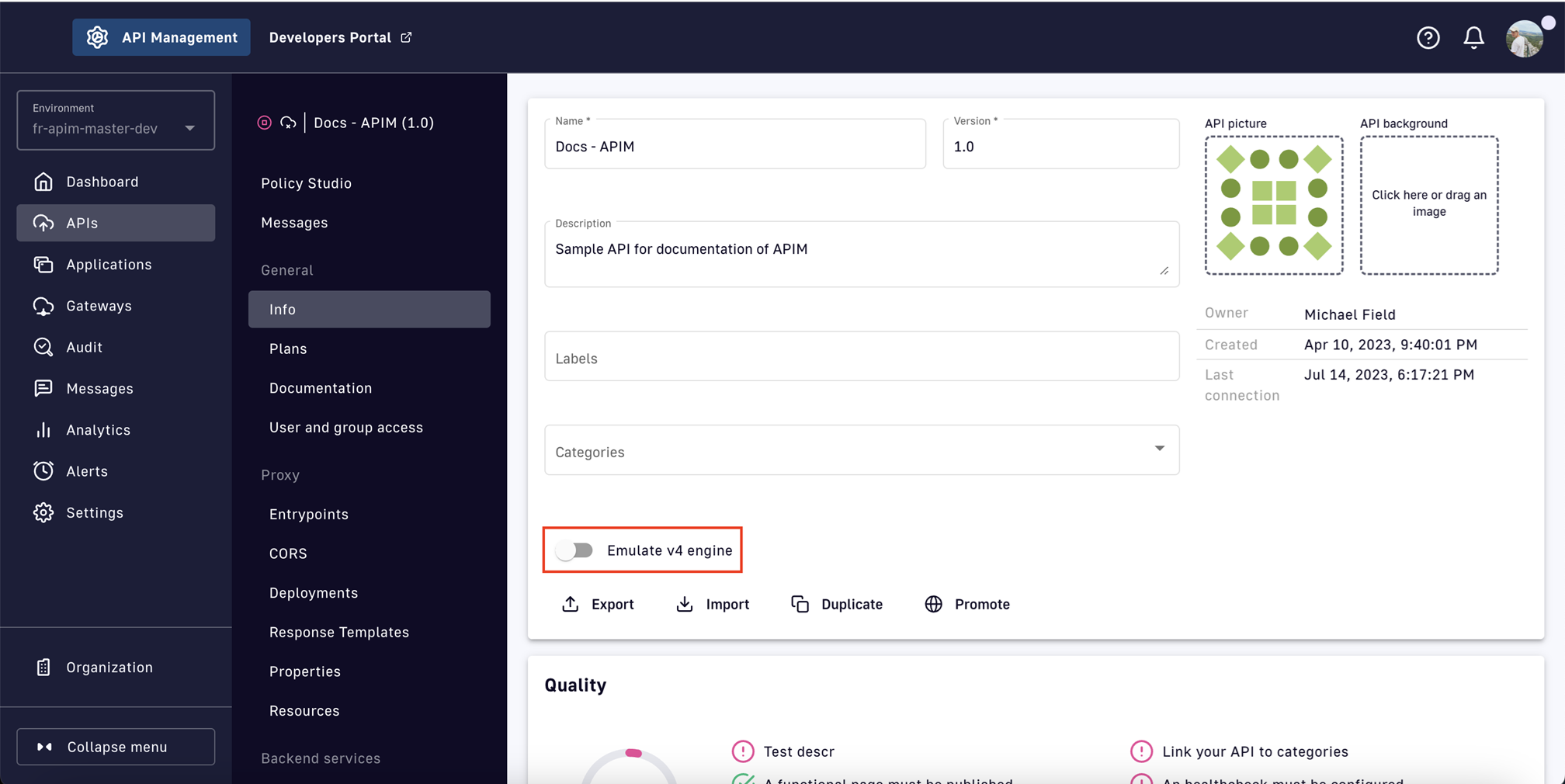
Enabling this option allows v2 Gateway APIs to access the improvements built into the reactive execution engine. The functional benefits provided by the reactive engine are detailed in subsequent sections.
Warning: Some v4 Gateway API features are dependent on the API definition, not the execution engine. Therefore, v2 APIs in emulation mode will not receive the following benefits:
- Event-native API management: Support for event brokers, multi-entry points, QoS, etc.
- Analytics improvements:
- Message-level analytics with sampling
- Ability to disable analytics in the API definition
- Modified flow execution phases: request, response, subscribe, publish
- Flow required match option
- Generic flow selectors
Reactive Executive Engine and Legacy Execution Engine Comparison
Overview
The following comparisons can be made between the reactive and legacy execution engines:
- Policy execution
- Plan selection
- Flow
- Logging
- Expression Language
- Bad requests
- Origin validation
- Timeout management
Policy Execution
Legacy engine behavior
The legacy execution engine requires execution scopes to indicate the level at which a policy will work:
REQUEST: The policy only works on request headers. It never accesses the request body.REQUEST_CONTENT: The policy works at the request content level and can access the request body.RESPONSE: The policy only works on response headers. It never accesses the response body.RESPONSE_CONTENT: The policy works at the response content level and can access the response body.
Execution of all policies working on the body content are postponed until the policies working on headers have been executed. This leads to an execution order that is often different than the one originally designed.
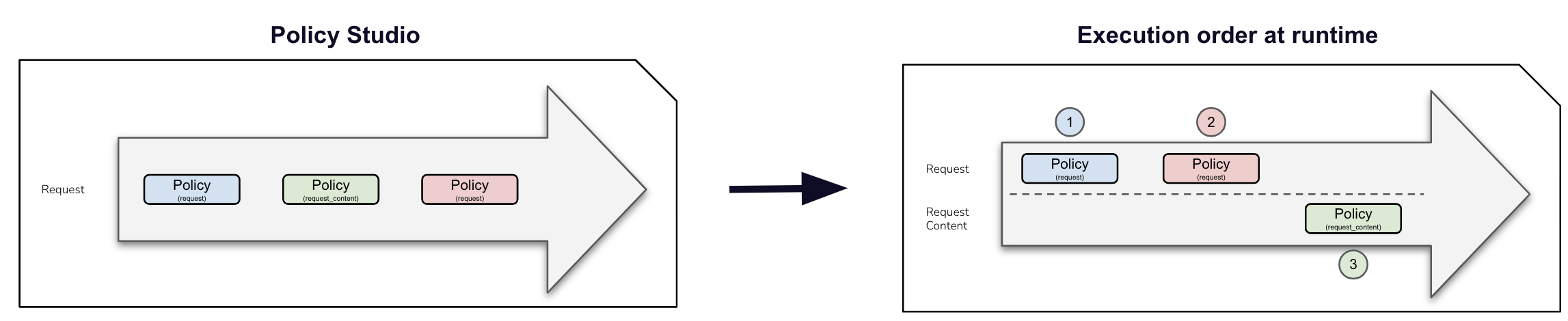
Reactive engine improvements
The reactive execution engine does not consider the REQUEST_CONTENT and
RESPONSE_CONTENT phases. All policies are executed in the exact order of
the design, regardless of whether they work on the content or not.

Migration considerations: If you have designed your APIs assuming the policy ordering imposed by the legacy execution engine, you must review your existing flows when enabling compatibility mode or migrating to a v4 API definition. Use the debug mode to test the new behavior and adapt your APIs to ensure they are safely redeployed.
Plan Selection
For both execution engines, the plan selection workflow parses all published plans in the following order: JWT, OAuth2, API Key, Keyless. Each plan type has specific rules.
JWT
- Retrieve JWT from
AuthorizationHeader or query parameters - Ignore empty
AuthorizationHeader or any type other than Bearer - **An empty Bearer token is now considered invalid**
OAuth2
- Retrieve OAuth2 from
AuthorizationHeader or query parameters - Ignore empty
AuthorizationHeader or any type other than Bearer - **An empty Bearer token is now considered invalid**
API Key
- Retrieve the API key from the request header or query parameters (default
header:
X-DSAPI-Api-Keyand default query parameter:api-key) - **An empty API key is now considered invalid**
Keyless
- Will ignore any type of security (API key, Bearer token, etc.)
- If another plan has detected a security token, valid or invalid, all flows
assigned to the Keyless plan will be ignored. A generic
401response will be returned.
Legacy engine behavior
With the legacy execution engine, the OAuth2 plan is selected even if the incoming request does not match a subscription. No JWT token introspection is done during OAuth2 plan selection.
Reactive engine improvements
When using the reactive execution engine, the OAuth2 plan is not selected if the
incoming request does not match a subscription. A token introspection is completed to
retrieve the client_id, which allows searching for a subscription. A cache
system is available to improve performance.
Flow
...
Logging
...
Expression Language
...
Bad Requests
...
Origin Validation
...
Timeout Management
...